Introduction and Review of BingX Exchange for Iranians
The BingX exchange is a well-known platform in the cryptocurrency trading space, allowing users to buy and sell a variety of digital assets. It has gained significant popularity among Iranian users due to its simple user interface, support for spot and futures trading, copy trading features, competitive fees, and ease of access.
For the latest in finance news, you can follow Nima Imani’s website.
Table of Content:
- Features
- Advantages of BingX Exchange
- Terms of Use for Iranians on BingX
- Credibility of BingX Exchange
- Types of Trading on BingX Exchange
- Features and Services of BingX Exchange
- BingX Exchange Fees
- Comprehensive BingX Tutorial
- How to Open a BingX Account
- What is Copy Trading?
- How to Use TradingView on BingX
- General BingX Tips
- How to Convert Assets on BingX
- Deposit and Withdrawal Process for Cryptocurrencies on BingX
- How to Withdraw Cryptocurrencies from BingX
- Conclusion
Features:
- Asset Variety: BingX offers a wide range of popular cryptocurrencies, including Bitcoin, Ethereum, Ripple, Litecoin, and many others.
- Fees and Costs: The exchange aims to attract traders with a transparent fee structure, clearly disclosing all costs and commissions before each transaction.
- Security Features: BingX utilizes advanced encryption technologies to protect user data. It also supports two-factor authentication (2FA) and the use of physical security keys for enhanced security.
- Customer Support: BingX maintains an active support team ready to address user inquiries and issues.
Advantages of BingX Exchange
BingX is a cryptocurrency trading platform with several distinct advantages that may appeal to traders and investors. Here are some of its key benefits and features:
- Asset Diversity: BingX provides a vast selection of reputable cryptocurrencies such as Bitcoin, Ethereum, Ripple, Litecoin, and others. This variety allows users to make choices that align with their specific needs and trading strategies.
- Transparent Fees: Clear and upfront information about fees and costs is a significant advantage of BingX, helping users better manage their trading expenses and make more informed financial decisions.
- Security: BingX employs advanced encryption technologies to safeguard user information. The availability of two-factor authentication and the option to use physical security keys further bolster security.
- Customer Support: BingX boasts a robust and responsive customer support team dedicated to assisting users with their questions and problems, which can be invaluable during the trading process.
- Loyalty Program: BingX’s loyalty program rewards users with exclusive benefits and discounts as their activity and trading volume increase.
- Market Analysis: The platform offers market analyses and news related to cryptocurrencies, equipping users with the latest information and insights to inform their trading decisions.
It is important for users to carefully review the terms and conditions of any exchange and assess up-to-date information before using its services.
Terms of Use for Iranians on BingX Exchange
The terms of using BingX for Iranian users generally include the following considerations:
- Number and Types of Assets: While BingX offers a wide array of cryptocurrencies, some platforms might impose specific restrictions on certain assets for Iranian users. It’s advisable to verify which assets are fully accessible.
- Fees and Costs: Conditions regarding trading fees, deposit, and withdrawal charges may vary. Some exchanges might implement specific fees for Iranian users.
- Identification and Verification (KYC): Most exchanges require identity verification and documentation. The information requested from Iranian users might differ from that of users in other regions.
- Geographical Restrictions: Some exchanges may limit their services based on the user’s location. Therefore, Iranian users must ensure that the platform’s services are fully available and compliant within their country of residence.
- Customer Support: The quality and responsiveness of the customer support team are crucial for resolving issues. It’s important to confirm that BingX provides strong support accessible to Iranian users.
- Account Limitations: User accounts may be subject to certain limitations due to legal restrictions or the exchange’s internal policies.
It is highly recommended to thoroughly read the terms and conditions of any exchange before registering and, if necessary, contact the support team to ensure you can fully utilize its services.
Credibility of BingX Exchange
According to CoinMarketCap, a reputable source, BingX ranks 20th among exchanges, although this ranking may change over time. The exchange’s daily trading volume is approximately $6.7 million. Being listed on a respected website like CoinMarketCap lends significant credibility to the exchange and helps build user trust.
BingX’s official website states that the platform attracts around 8 million monthly visitors. Currently, users from all over the world benefit from its services, and there have been no published complaints or reports of scams, money laundering, or account hacks.
Types of Trading on BingX Exchange
BingX offers several types of trading for its users:
- Market Orders: In this type of order, you buy or sell immediately at the best available market price. Market orders execute quickly and are suitable for users who want to trade instantly.
- Limit Orders: With limit orders, you set a specific price for buying or selling. The order only executes when the market price reaches your specified limit. This allows for more precise trading.
- Special Orders: BingX also provides various special order types. These may include conditional orders, options, or other specific order types that allow users to trade under their preferred conditions.
- Spot Trading: In spot trading, you engage directly in the market, buying or selling assets in real-time. This type of trading is generally suitable for professional traders.
- Futures Trading: This allows you to trade based on the future price of assets, allowing you to profit from anticipated price movements.
Each of these trading types has its own characteristics and benefits, and users can choose them based on their strategy and goals.
Features and Services of BingX Exchange
BingX is a reputable platform offering a comprehensive range of features and services:
- Asset Variety: The exchange supports a wide array of digital assets, including Bitcoin, Ethereum, Ripple, Litecoin, and other popular cryptocurrencies.
- Trading Platform: BingX provides a user-friendly trading platform with diverse features, including Market Orders, Limit Orders, Special Orders, and Spot Trading.
- Specialized Trading: The exchange also offers specialized trading options, allowing users to execute trades under specific conditions.
- Futures Trading: Enables trading based on the future price of assets to capitalize on market fluctuations.
- Security Features: BingX employs advanced security measures to protect user information, such as two-factor authentication (2FA) and other security tools.
- Education and Information: The exchange offers educational programs and informational resources to enhance users’ knowledge of digital trading.
- Customer Support: BingX provides customer support via email, phone, and online chat.
- Suitable for Iranians: The exchange is particularly popular among Iranian users, offering specific features like Persian language support and insurance up to €5 million for its Iranian clients.
- Market Statistics: BingX provides users with market data, statistics, and price charts.
- Coin Listing Requests: Users can request the addition of new coins to the platform.
These services and features enable users to participate in the digital trading world with greater diversity and confidence.
BingX Exchange Fees
BingX applies the following fees for different types of transactions:
- Perpetual Futures:
- Taker: 0.05%
- Maker: 0.02%
- Standard Futures:
- Upon position closure: 0.045%
- Spot:
- Taker: 0.1% to 0.2%
- Maker: 0.05% to 0.2%
These fees are considered average compared to other cryptocurrency trading platforms, generally being on the lower side. Additionally, the trading spread for the Bitcoin network ranges from 0.02% to 0.1%, and for other blockchains, it can be up to 0.2%.
BingX does not charge any fees for deposits. The withdrawal fees for Bitcoin and Ethereum are 0.0005 BTC and 0.007 ETH, respectively. These amounts are slightly higher when compared to most other platforms. It should be noted that withdrawal fees for other cryptocurrencies or fiat currencies may vary depending on network traffic.
Comprehensive Guide to BingX Exchange
BingX is the first social digital exchange that has entered the world of blockchain and cryptocurrencies with its unique copy trading feature.
Founded in April 2018, the exchange was initially named Bingbon. However, considering the growing popularity of social finance (SocioFi) and the development of the cryptocurrency market, Bingbon decided to become the world’s first social trading platform and was rebranded as BingX in November 2021.
How to Install the BingX App
iOS Version
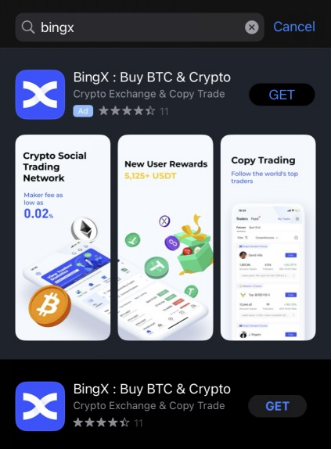
- Method 1: Search for BingX in the App Store and click “Get” to install the application.
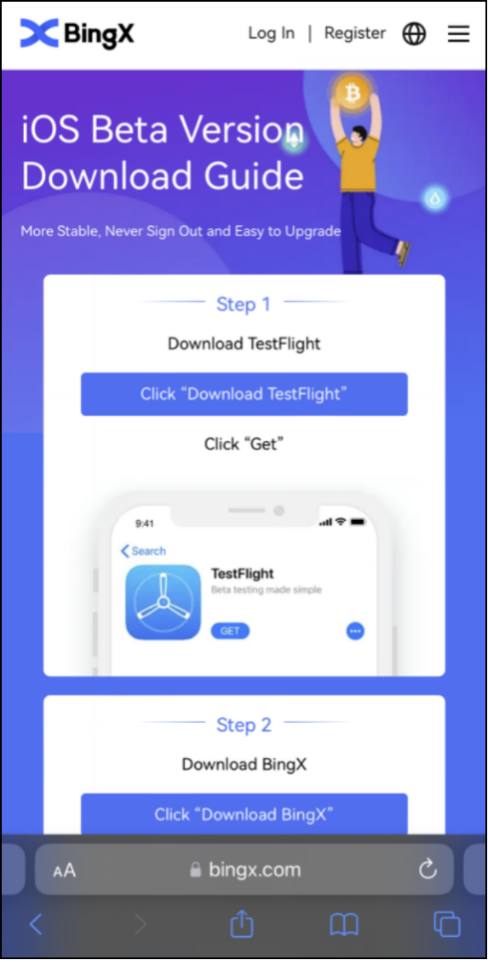
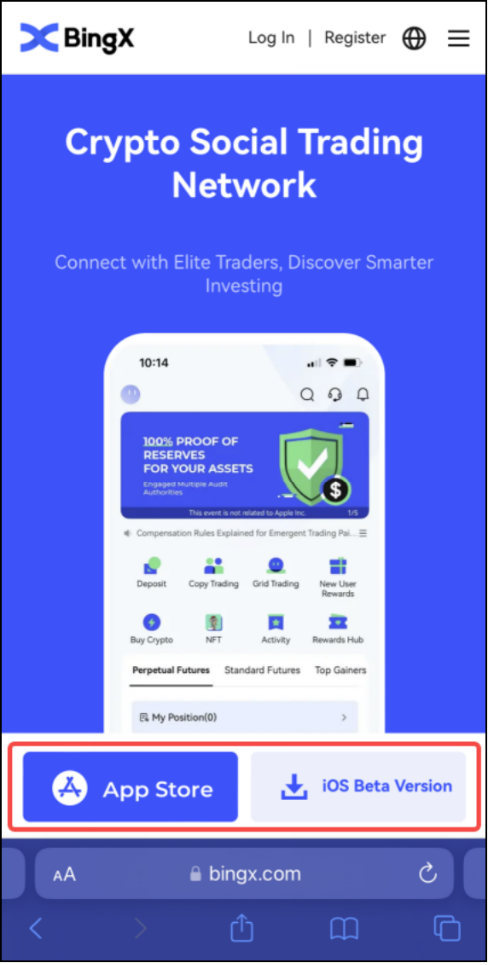
- Method 2: Click the download icon in the upper right corner of the official BingX website. Use a scanning app (like your camera) to scan the QR code and open the download page. Then, click on “App Store” to download the BingX app.
Android Version
- Method 1: Search for BingX in the Google Play Store to install the app.
- Method 2: Click the download icon in the upper right corner of the official BingX website. Use a scanning app (like your camera) to scan the QR code and open the download page. Click on “Google Play” to download the BingX app from there. Alternatively, click the “Download” button to directly download and install the BingX app.
How to Open a BingX Account
App Registration Guide
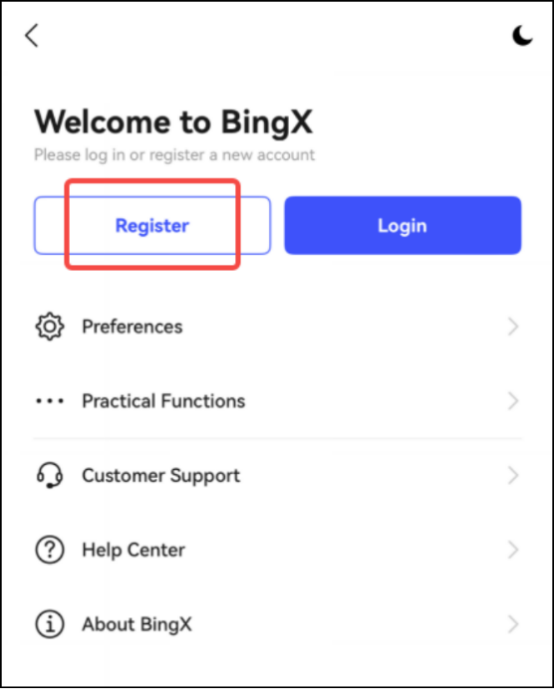
- Step 1: On the main page, click the avatar icon in the upper left corner. Then, click “Register” to start the registration process.
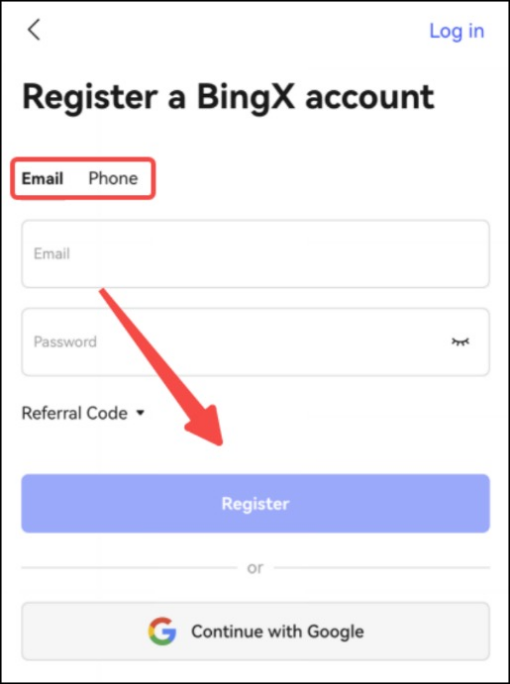
- Step 2: Choose your preferred registration method (phone number or email address), enter your details, and set your password. Then, click “Register.” (Note: Passwords must be 8 to 20 characters long and include both letters and numbers).
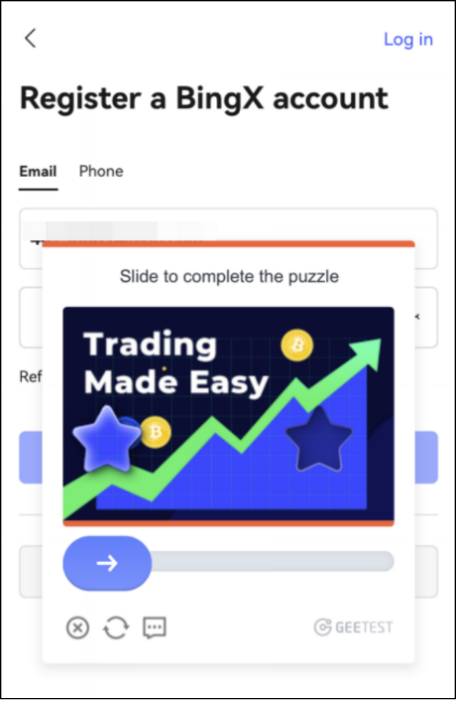
- Step 3: Slide the arrow to the right to complete the security verification puzzle. Finally, enter the verification code sent to your registered email or phone number.
Web Registration Guide
- Step 1: Visit the official BingX website (https://bingx.com). On the homepage, click “Sign Up” in the upper right corner to begin registration.
- Step 2: Choose your preferred registration method, enter your phone number or email address, and set your password. Read and agree to the “Customer Agreement and Privacy Policy” by checking the box. Afterward, click “Sign Up.” (Note: Passwords must be 8 to 20 characters long and include both letters and numbers).
- Step 3: Slide the arrow to the right to complete the security verification puzzle. Finally, enter the verification code sent to your registered email or phone number. Your registration will then be successful.
What is Copy Trading?
Copy trading is a system where professional traders trade on behalf of their followers for a small portion of their net profits. This creates a win-win situation for both professional traders and copy traders. Furthermore, a follower can choose from a list of available professional traders and follow more than one trader simultaneously.
Why Beginners Prefer Copy Trading
Copy trading is a preferred choice for beginners because it allows them to replicate the trades of experienced professional traders. They essentially follow the positions opened by these professional traders and, in return, pay a percentage of their net profit or a monthly fee. This provides beginners with an opportunity to learn the intricacies of trading while earning potential returns.
Before You Start Copy Trading
Before embarking on your copy trading journey, it’s crucial to thoroughly research the traders you plan to follow. By investigating their trading history and performance, you can gain confidence in their strategies. Reviewing their profiles will give you insights into which traders are consistently making successful trades, helping you make informed decisions about who to follow.
Types of Copy Trading on BingX
BingX offers two main types of copy trading:
- Copy Trade by Amount:
In this method, users set a maximum margin amount for each individual trade. For example, if a user sets the maximum margin per trade to 10 USDT, any order placed by the trader will be followed with a margin of up to 10 USDT, regardless of the trader’s original order margin.
- Copy Trade by Proportion:
For proportional copy trading, users set a “unit standard.” For instance, if a trader places an order for 1 unit and the user has set the “unit standard” to 10 USDT/Unit, the follower will execute that order with a margin of 10 USDT. If the trader then places an order for 2 units, the follower’s order will be for 20 USDT. Market liquidity affects the actual order size in proportional copy trading.
How to Start Copy Trading on BingX
-
Step 1: Access Copy Trading. Whether on the app or website, click on “Copy Trading” from the homepage.
-
Step 2: Select a Trader. You can choose from “Trending Trader” or “Conservative Trader” recommended by the system based on their past performance data. Click on their profile to view their “Trading Data” or “Feed.” If you have questions about any specific index, click on the indicator to see its definition.
-
Step 3: Initiate Copying. On the trader’s main page, click “Copy Now” to enter the copying settings.
-
Copy Trade Type: Choose between “Copy by Amount” or “Copy by Proportion,” depending on the account type the trader is using.
-
Principle Currency: USDT and VST (Virtual USDT) are available for copy trading under Standard Futures. USDT is used for copy trading with Binance Futures and BingX Spot Grid.
-
Trading Funds: For BingX Standard Futures copy trades, users can set “Single Trade Principle,” “TP/SL,” “Daily Copy Trading Principle,” and “Max Position Margin.” For Binance Futures copy trades, users can configure “Trading Funds Copy,” “Copy Trader’s Current Positions,” and “TP/SL.” For BingX Spot Grid copy trading, users can set the “Trading Pair,” “Trading Funds Copy,” and “Copy Trader to Close Grid Parameters.”
-
Step 4: Review Your Copy Trading Data. Click on “My Trades” to check your copy trading data:
-
Overview: Displays “Today’s Earnings” and “Total Earnings.” Click “Details” for more information.
-
Current: Shows open copy trading orders that have not yet been closed.
-
Copying History: Lists closed USDT and VST copy trading orders.
-
Step 5: Edit or Cancel Copy Orders. Navigate to “My Trades” -> “Current” and tap on the trader you are following. To stop copying manually, click “Stop Copy.” Once canceled, you will no longer copy that trader’s orders, and they will be removed from your copy list. Existing copied orders will close when the trader closes their positions. Click “Edit” to modify your “Copy Settings.”
How to Use TradingView on BingX
TradingView allows users to create customized toolsets for technical analysis with more powerful tools and options. You can quickly access and utilize it directly from the BingX trading page.
- How to Trade on TradingView
- Step 1: Click on “Standard Futures” in the top navigation bar on bingx.com to enter the trading page.
- Step 2: Click on “Chart by TradingView” below the K-line chart for quick access to the TradingView website.
- Step 3: On the TradingView website, click the avatar box in the top navigation bar to change the supported languages. Click the “Chart” button for quick access and to view charts.
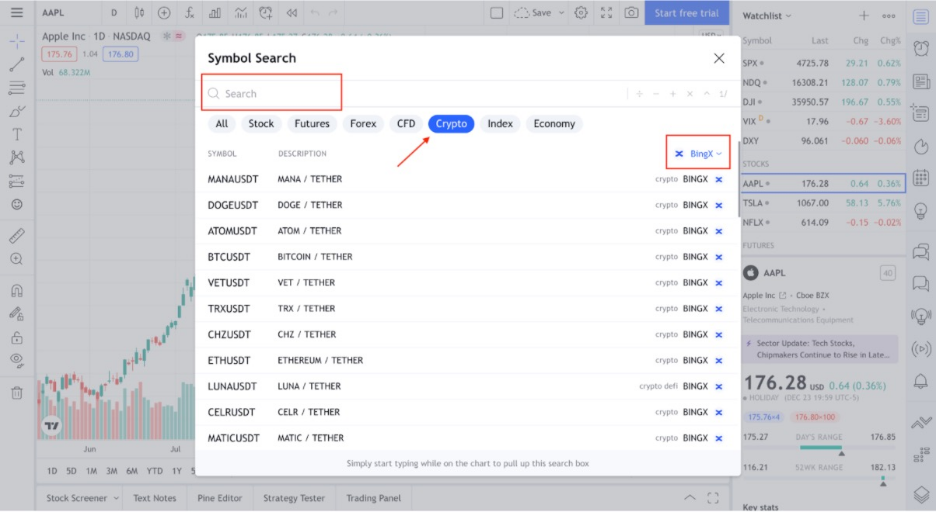
- Step 4: To search quickly, click the red box in the upper left corner of the chart. Click “All sources” to select/search for resources from different platforms.
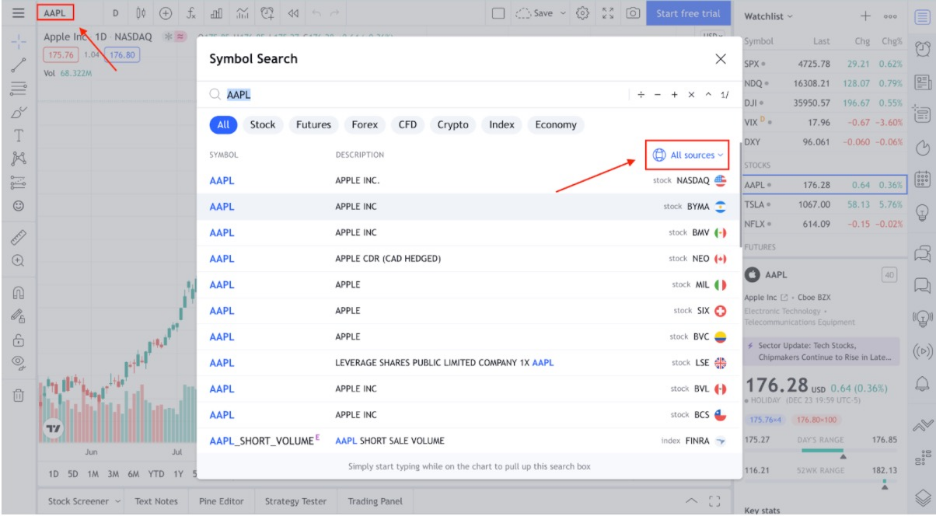
- Step 5: After changing the source to BingX, click on “Crypto” to quickly view all cryptocurrency pairs supported by BingX. You can also perform a quick search in the “Search” bar.
Linking TradingView to BingX
- Step 1: Click on “Trading Panel” and select BingX to connect it to TradingView.
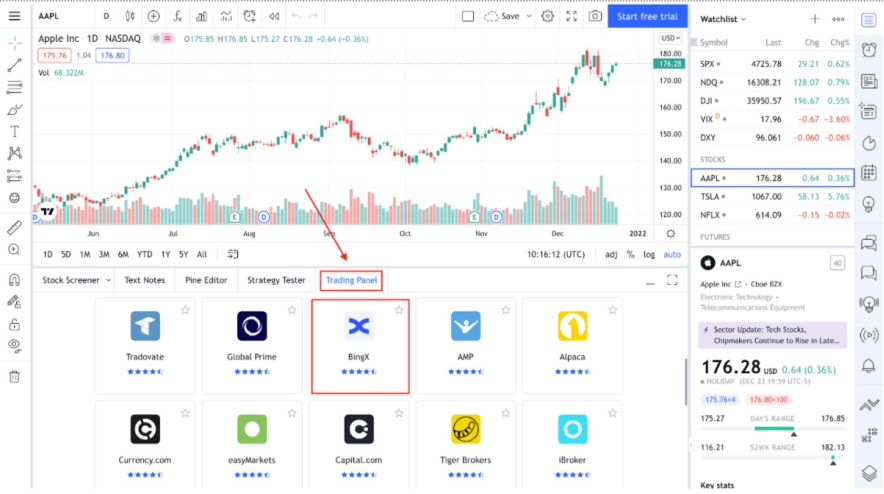
- Step 2: To connect TradingView to BingX, log in to your TradingView account or sign up. You will then be redirected to the BingX login page.
TradingView Tool Instructions
-
Step 1: After connecting to your BingX account, click on the icon located on the right sidebar, as indicated below, to open the order panel and begin trading.
-
Step 2: After placing an order, navigate to the trading panel at the bottom left to review the order details.
General Tips for BingX Exchange
Homepage:
The homepage features quick links to information pages, a login/signup section, a language selection menu, and a button to download the mobile application.
-
Derivatives Selection Tab: The “Standard Contract” opens a page with a trading platform and futures tools for cryptocurrencies, indices, commodities, and forex. The “Perpetual Swaps” tab opens a page with derivatives that do not have an expiration date.
-
Payment Systems: The exchange is integrated with payment systems like Coinify, Advcash, Paxful, etc. You can purchase cryptocurrencies using a bank card, and the coins will be deposited into your exchange account.
-
Market Section: In the “Market” section, you can view, study, buy, or sell cryptocurrencies in the spot market, and also perform instant coin swaps.
-
Copy Section: This section contains all necessary information about traders whose trades can be copied. It also offers the opportunity to register yourself as a copy trader, allowing you to easily share your trades and earn additional income. You can also recommend a trader.
-
BingX Blog: On the BingX blog, where the exchange shares company news, you can stay updated on new features and find important global news about the crypto industry.
-
App Download Button: A button to download the BingX application on your smartphone.
-
Language Selection Menu: Available languages include: English, Russian, Chinese, Vietnamese, Spanish, Korean, Indonesian, Japanese, Turkish, and Dutch. The list of languages is continuously updated, and the exchange expects Portuguese and German to be added soon.
-
Trader List: A list of traders with the best profit indicators over the past 30 days.
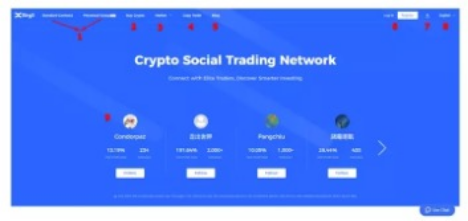
The image displays a page with the following elements:
- A column featuring news and announcements.
- A link to the user manual.
- A registration button.
- A “quote” or pricing section.
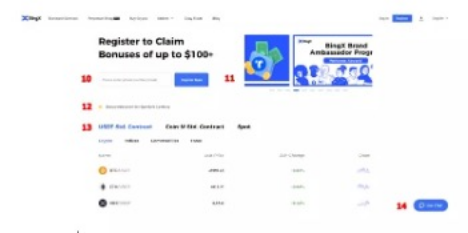
- Email Login Field: For email-based registration.
- BingX Exchange Announcements Column: A dedicated section for exchange announcements.
- BingX Exchange Guide: Instructions on how to use the BingX exchange.
- Trading Pair Quotes: Quotes for actively traded pairs on the exchange. These are categorized by the quote currency for derivatives, with spot market instruments in a separate column.
- Support Staff Contact Button: A button to contact a support staff member.
How to Convert Your Assets on BingX
BingX Convert is a convenient tool that allows you to exchange your existing cryptocurrency for another within your wallet account. It supports over ten cryptocurrencies, including BTC, ETH, and USDT.
You can deposit cryptocurrencies into your BingX account. If you wish to convert your assets to other currencies, simply navigate to the Convert page. Below are the instructions for converting cryptocurrencies on both the BingX website and app.
Web
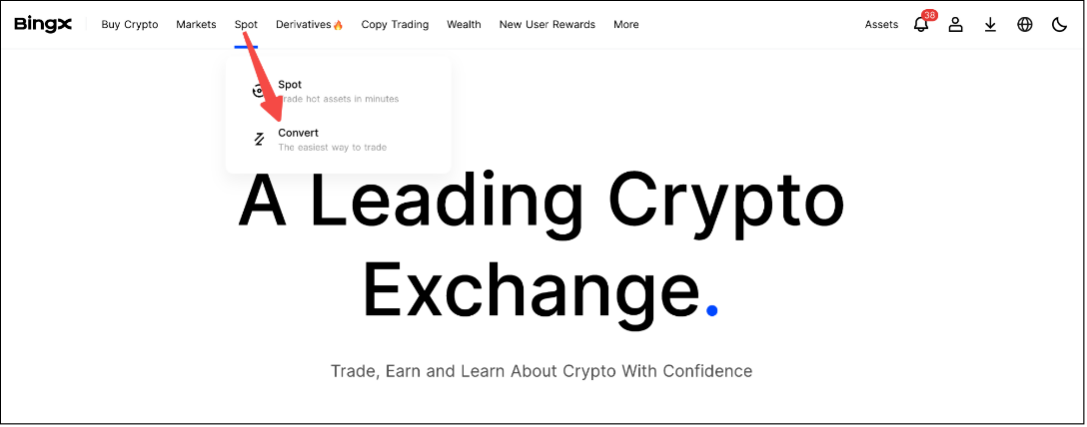
- Step 1: Log in to your BingX account and click on “Convert” as shown in the image.
- Step 2: Select the cryptocurrency you hold in the “Spend” section, and then choose the cryptocurrency you wish to receive in the “Receive” section.
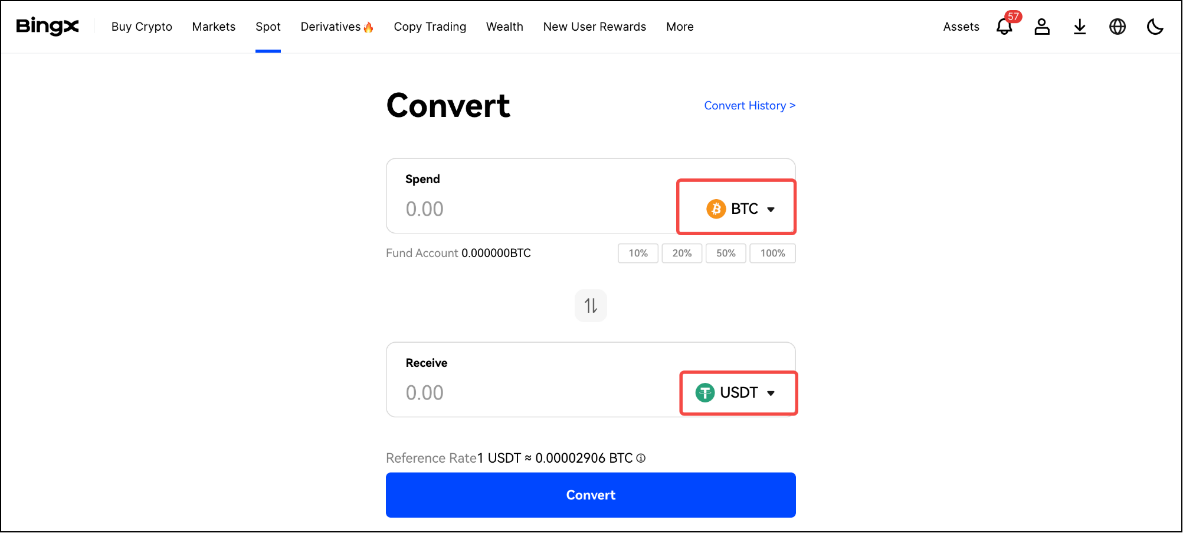
- Step 3: Enter the amount of cryptocurrency you want to pay in the “Spend” field, or the amount you want to receive in the “Receive” field. You will immediately see the reference exchange rate on BingX. If you accept this rate, click “Convert” to proceed.
App
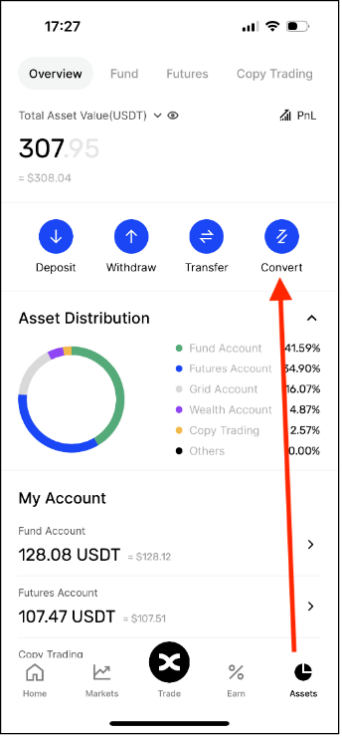
- Step 1: Log in to your BingX account, visit the “Assets” page, and tap on “Convert.”
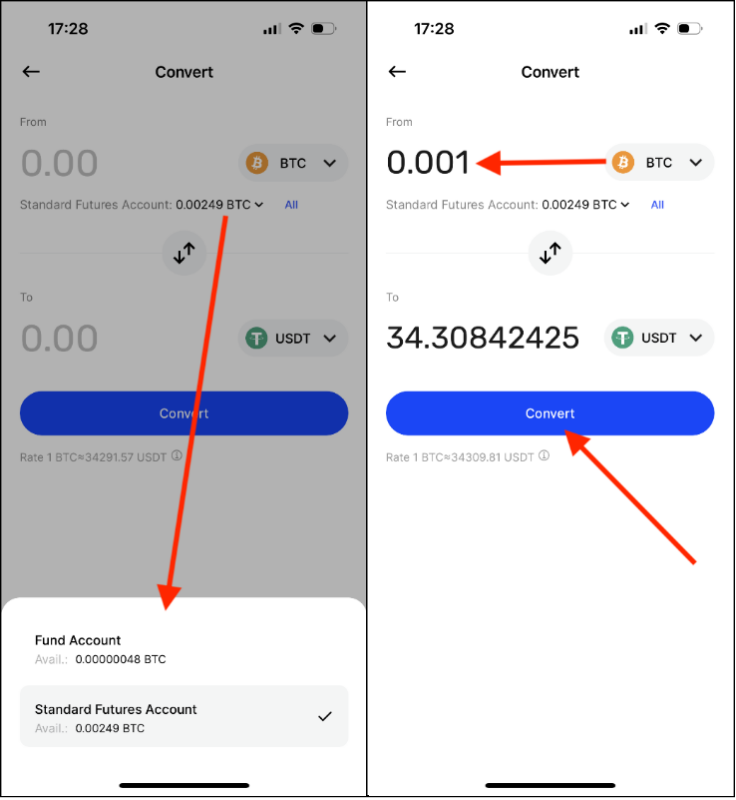
- Step 2: Select an account, choose a cryptocurrency, and enter the amount you wish to convert. You will instantly receive the reference exchange rate on BingX. If you agree with this rate, tap “Convert” to proceed.
Process of Depositing and Withdrawing Cryptocurrencies on BingX Exchange
At BingX, you can easily deposit and withdraw cryptocurrencies, as well as transfer assets to/from other platforms/wallets.
How to Deposit Cryptocurrencies
Web
-
Step 1: Log in to your BingX account, click on the wallet icon in the top-right corner of the homepage, and select “Deposit” from the dropdown menu.
-
Step 2: Select your desired cryptocurrency, network, and deposit account.
-
Step 3: Copy the deposit address and proceed to the withdrawal platform to initiate the transfer. Alternatively, open the withdrawal platform, navigate to the withdrawal page, and locate the address field. Tap the scan icon within the address field. Scan the QR code displayed on the BingX deposit page using your app’s scanning feature.
App
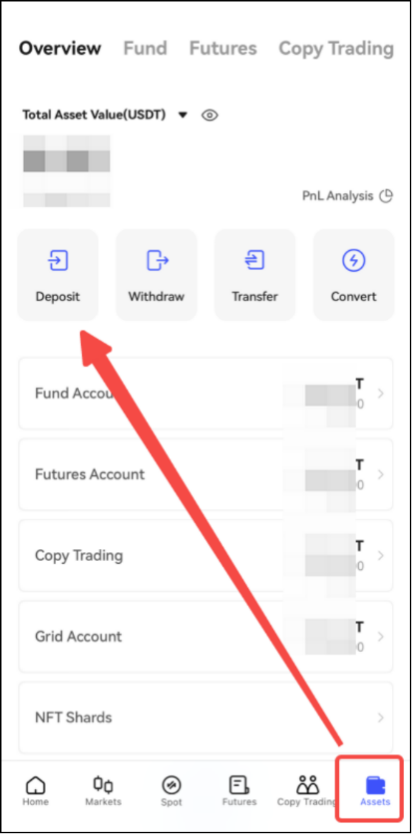
- Step 1: Log in to your BingX account, click the “Assets” button in the bottom-right corner of the main page, and click “Deposit.”
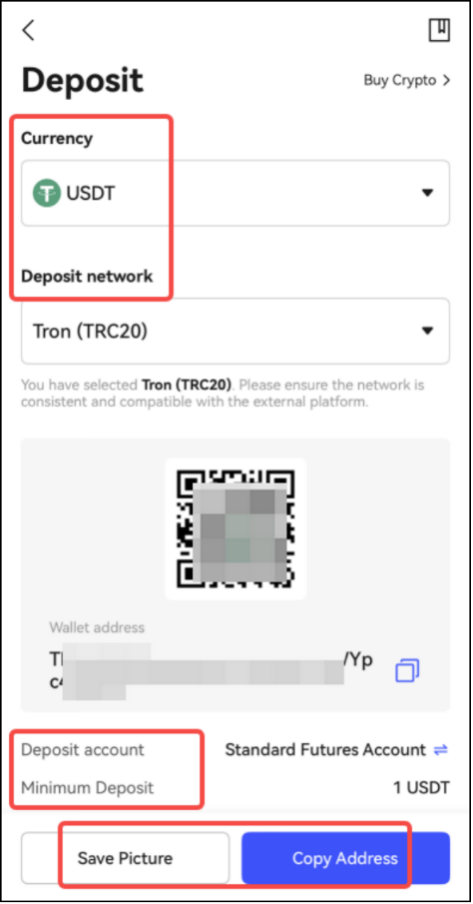
- Step 2: Select the cryptocurrency, network, and your deposit account. If you need to upload the deposit address QR code to the withdrawal platform’s app, click “Save Image.” Alternatively, click “Copy Address” to directly copy the deposit address and paste it into the address field of the withdrawal platform. After completing these steps, proceed with the transfer on the withdrawal platform.
Important Notes:
- Please ensure the selected cryptocurrency and deposit network (chain) are correct. Incorrect selections will result in the loss of your assets, rendering them unrecoverable.
- Deposits require confirmation across the entire blockchain and typically arrive within 10 to 60 minutes. You will be notified via SMS upon successful deposit.
- The minimum deposit amount is 1 USDT. Any transfers below this amount will not be credited and are non-refundable.
- Deposit speed may exceed the usual timeframe due to network congestion. You can retrieve the TxID from the withdrawal platform to check the status of your asset transfer.
How to Withdraw Cryptocurrencies on BingX Exchange
Web
-
Step 1: Log in to your BingX account, click the wallet icon in the top-right corner of the homepage, and select “Withdraw” from the dropdown menu.
-
Step 2: Choose a withdrawal method. Currently, there are two withdrawal methods available: Withdrawal and Internal Transfer.
-
Withdrawal: Select the withdrawal currency and network, then enter the address and withdrawal amount. Choose your withdrawal account (under “Withdrawal Count”), confirm the withdrawal fee, and finally click “Withdraw” to complete the withdrawal.
-
Internal Transfer: Select the withdrawal currency and transfer method. In the next step, enter the User UID/Email/Phone Number and the withdrawal amount. Select your withdrawal account (under “Withdrawal Count”) and finally click “Withdraw” to complete the withdrawal.
App
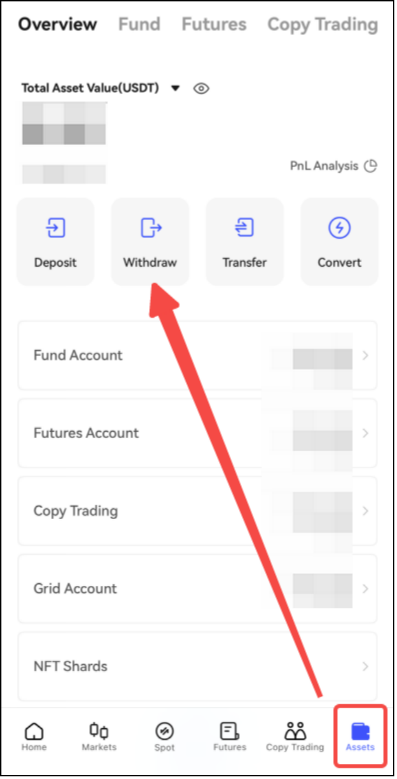
- Step 1: Log in to your BingX account, click the “Assets” button in the bottom-right corner of the homepage, and tap “Withdraw.”
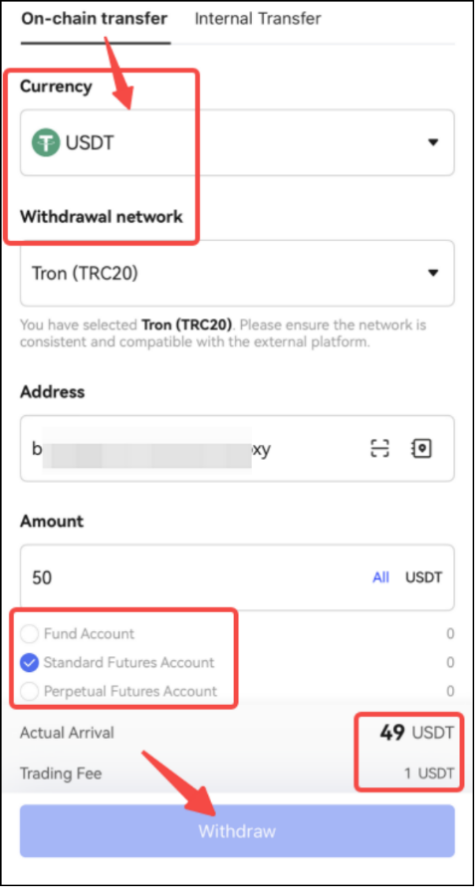
- Step 2: Choose a withdrawal method. Currently, there are two withdrawal methods available: Chain Transfer and Internal Transfer.
Conclusion
Overall, the BingX cryptocurrency exchange offers a platform setup and security levels comparable to the top 10 cryptocurrency exchanges. A key differentiator lies in its implementation of social features, stock trading, and copy trading functionalities.
As a cryptocurrency exchange integrated with platforms like TradingView, BingX demonstrates its legitimacy. Trading in other markets such as oil or gold when the crypto market is less volatile presents an opportunity to profit and diversify your portfolio.
Similar articles you need to read:
Introduction and Review of Tabdeal Exchange for Iranians
Review and Analysis of Wallex Exchange for Iranians
Comparison of Nobitex and Wallex Exchanges for Iranians: Which One is Better
Introduction and review of the Iranian exchange Bit24
Introduction and review of the Iranian exchange Exir
Introduction and review of the Iranian exchange Excoino
Introduction and review of the Iranian exchange Ramzinex
Introduction and review of the Iranian exchange Bitpin